
 Airfoil
 Audio Hijack
 Farrago
 Fission
 Loopback
 Piezo
Piezo
 SoundSource


Copyright © Rogue Amoeba Software, Inc. All rights reserved.


Airfoil for Mac can stream audio from just about any application running on your Mac. With many popular audio applications, an enhanced experience offering both metadata and remote control is provided.
When you stream audio from supported sources through Airfoil Satellite (or the older Airfoil Speakers), an Apple TV, or many third-party AirPlay devices, you'll see enhanced metadata, including track titles and album artwork. These outputs will also be able to remotely control audio playback in the source application.
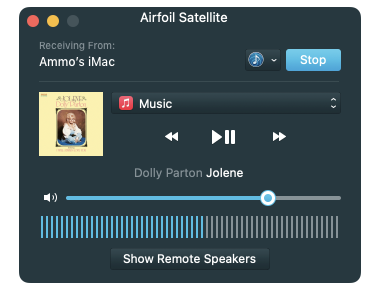
In the screenshot above, for instance, Airfoil Satellite for Mac is receiving audio from Music, via Airfoil. Album art and track titles are being shown, and remote control buttons are available to control playback.
Airfoil itself is not able to gather metadata or provide remote control of web-based audio. However, it is possible to get an enhanced experience while playing audio from supported sites using BeardedSpice.

The free BeardedSpice application can run in the background to control web-based media players. If it's running when you select a supported browser (Safari or Chrome) as your source, Airfoil will communicate with BeardedSpice to provide metadata and remote control of the audio in the browser.
For more details, and a list of supported websites, see the BeardedSpice page.
The following applications provide Airfoil with some amount of metadata (track titles and/or album art), but cannot be remote controlled:
The following applications can be remote controlled by Airfoil, but do not provide metadata:
Let us know any audio application you'd like to see work with Airfoil Satellite!
If you're a developer who makes an audio application, you can integrate with Airfoil and Airfoil Satellite as well. Start with this blog post, and send us an email.

If you need personal assistance or want to provide feedback, our friendly support team is available via email. Click below to get in touch:
Contact UsWe're amazingly responsive! We strive to reply in under 24 hours.