
 Airfoil
 Audio Hijack
 Farrago
 Fission
 Loopback
 Piezo
Piezo
 SoundSource
Copyright © Rogue Amoeba Software, Inc. All rights reserved.



Users often ask us if they can try beta versions of our software. We don't have a public beta program, but if you wish to receive updates before they're officially released, you can access test releases.
A test release is the precursor to a full, official release of our software, and it's typically made available in the weeks before an official update. Like all software, these releases may have unknown bugs, but they're well-vetted internally prior to posting. We expect them to be suitable for general use, though they're not recommended for those with production systems.
By turning on test releases, you can try out changes to our products before the general public.
Test releases are delivered through our software's built-in software update system. To be alerted to test releases for a product, you need to opt in from the application itself. This is done by changing a hidden preference in the app’s Debugging window. Just follow the instructions below.
Open the Help menu in Piezo’s menu bar.
Hold the Option ⌥ key on the keyboard, then select the Quit and Relaunch for Debugging command from the menu.
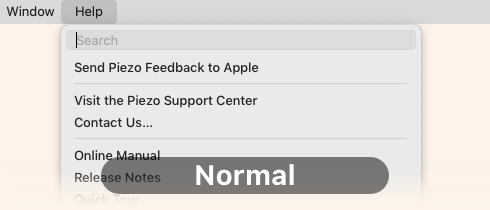
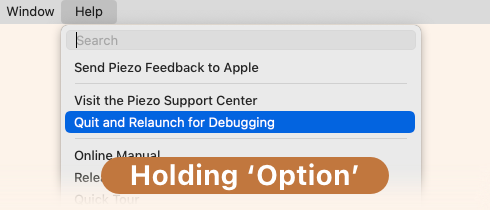
The software will now relaunch, and its Debugging window will appear. Locate the Hidden Preferences section.
Enable the Check for test releases option, then click the Done button.
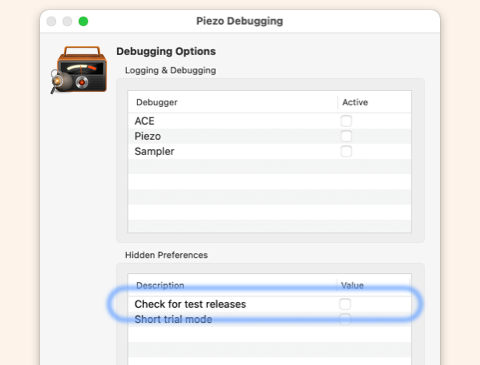
That's it! The software will now alert you when a test release is available, giving you the option to download it.
If you ever wish to revert to using official public releases, that's easy as well—follow these steps:
Delete the test release by placing it in the Trash.
Download the public release from our front page.
Launch the official release, then follow the same instructions as above to access the Debugging window.
Once the Debugging window is visible, uncheck the Check for test releases option then click Done.
You'll now be back to using an official release, and the software update system will no longer inform you of new test releases.

If you need personal assistance or want to provide feedback, our friendly support team is available via email. Click below to get in touch:
Contact UsWe're amazingly responsive! We strive to reply in under 24 hours.